This guide walks through applying a downloaded PAL mod to your Street Fighter III: 3rd Strike ROM using PalMod, so it's ready to play in FightCade.
1. Unzip your ROM files
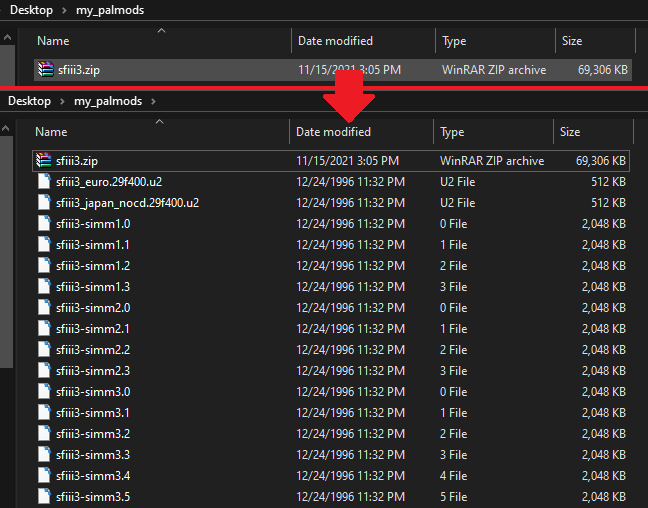
Locate your sfiii3.zip ROM files and extract them
into a single folder.
(Always keep a backup in case anything goes wrong or is corrupted.)
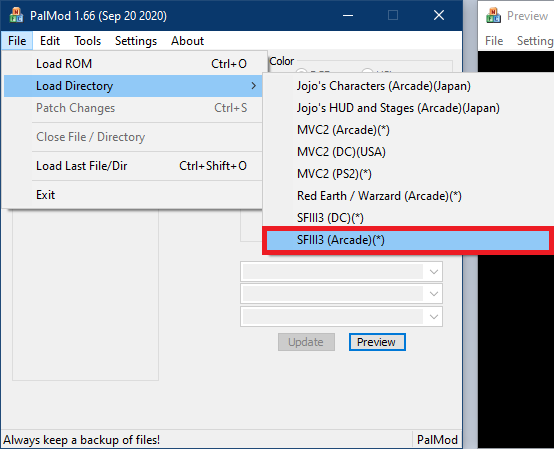
2. Load the directory in PalMod
Open PalMod, then go File → Load Directory → SFIII3 (Arcade), and select the folder you just extracted everything into. This loads the character costumes currently on file.
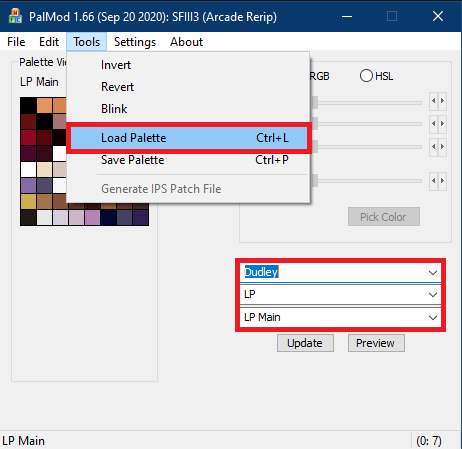
3. Select your character and load the palette
Using the dropdowns, choose the character and button (LP, MP, etc.) you'd like to modify. Then, go Tools → Load Palette and select the mod file you downloaded.
Every mod uploaded to this site is verified to use an indexed color palette on upload, so anything you download here is guaranteed to load correctly.
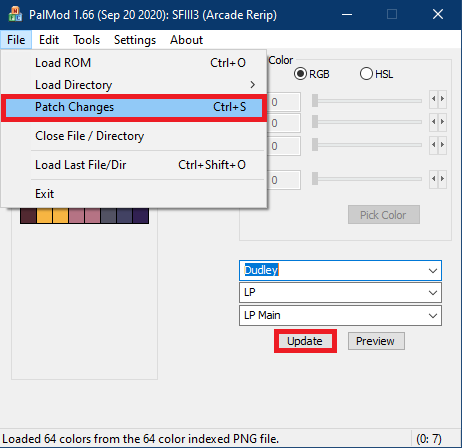
4. Apply and save your changes
Click Update to apply the palette.
Once you're happy with the result, go
File → Patch Changes to save it into your ROM files.
5. Re-zip and play
Re-compress the folder's contents back into sfiii3.zip, matching its original structure.
Then, place the .ZIP into your
FightCade ROMs folder. Enjoy your new costumes!